
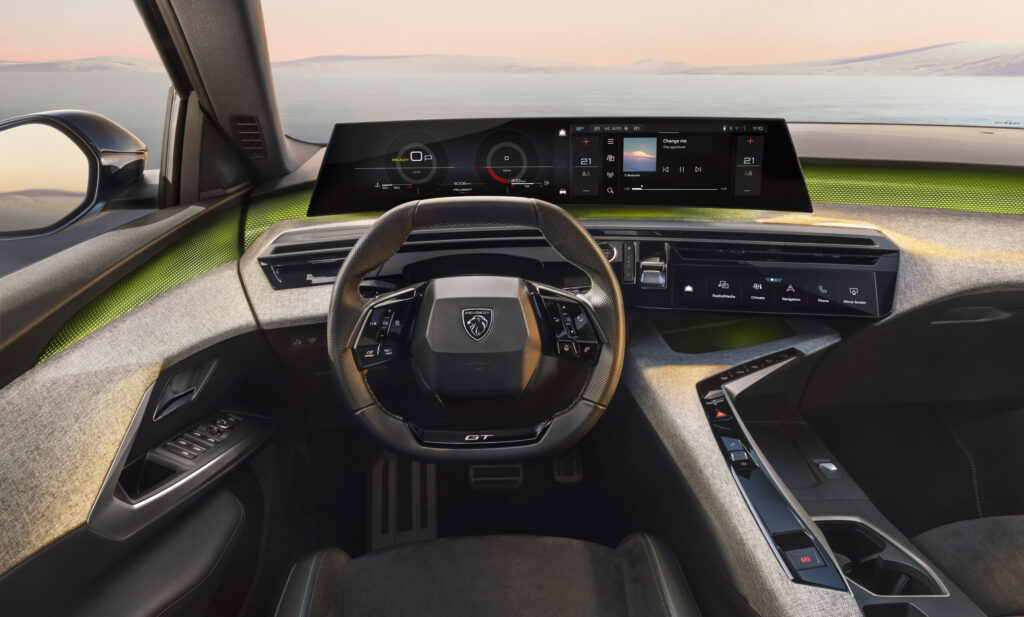
The Peugeot 5008 regularly suffers from infotainment faults that show up as a black screen, slow response, failing navigation and problems with Bluetooth and USB connections. In many cases a soft reset or software update helps, but recurring faults often point to a defective module, battery problems or outdated firmware that requires reprogramming or replacement of the unit. Do you recognise these issues in your own car?
Modern family SUVs like the Peugeot 5008 depend heavily on their infotainment system for day-to-day functions such as navigation, phone integration and media services. When that system glitches, you notice it immediately in everyday use. Fortunately, many problems can be solved with simple actions, but some faults require professional attention.
With the Peugeot 5008, infotainment complaints often boil down to a few recognisable symptoms. The display does not start up and stays black, the touchscreen responds slowly or freezes completely, or the sound suddenly cuts out. Connection problems with Bluetooth and USB are also common, as is a navigation system that suddenly switches off or crashes during use.
Why does the infotainment fail in the Peugeot 5008?
The causes of infotainment faults are varied and are often related to software, voltage or hardware. Software errors are the most common cause, especially after a failed update or when the system has been running for too long without an update. Modern infotainment systems run on complex software that needs to be patched regularly to fix bugs.
A second major cause is unstable on-board voltage. The Peugeot 5008 is sensitive to voltage issues, especially after the battery has been replaced or disconnected. A weak or defective battery can lead to error messages and a system that does not start up properly. Defective fuses can also bring the infotainment system completely to a halt.
In some cases there is a hardware defect in the infotainment unit itself. This mainly occurs in older models where the module fails after years of intensive use. Users report that repeated crashes are often the first sign of a failing unit that will eventually need to be replaced.
‘ Note: this reset erases all your personal settings, such as paired phones, stored addresses and audio settings. ’
How do I reset the navigation system of the Peugeot 5008?
A soft reset is often enough to get a frozen system working again. Press and hold the infotainment system’s on/off button for about 10 to 15 seconds until the screen goes black and the system restarts. This action does not erase any settings and can safely be repeated.
If a soft reset does not help, you can perform a factory reset. This restores the system to the factory settings, which can fix software-related faults. Go to the menu and navigate to Settings, then to Options, then System settings and finally Factory settings. Confirm your choice and wait until the system restarts. Note: this reset erases all your personal settings, such as paired phones, stored addresses and audio settings.
After a reset it is sensible to check immediately whether all functions are working again. Test the radio, Bluetooth connection, navigation and parking camera. Some settings will need to be configured again, so take a photo of your most important settings beforehand so that you can easily restore them later.
Software updates for Peugeot 5008 infotainment
Software updates fix bugs and performance issues and are therefore important for the stability of your infotainment system. Newer Peugeot 5008 models can sometimes receive updates over the air, which means the system automatically notifies you when a new version is available. Older models require a manual update via USB.
For a manual update, download the latest software from the Peugeot website or request it from your dealer. Put the files on a USB stick and insert it into the USB port of the infotainment system. The system recognises the update and asks for confirmation. Follow the on-screen instructions and make sure the engine is running during the update process to prevent voltage problems.
With modern infotainment systems, updating regularly is not a luxury but a necessity. Manufacturers release patches for known software issues, improvements in stability and compatibility with new phones and apps. Check at least twice a year whether updates are available.
Solving Bluetooth and USB problems
Bluetooth faults often show up as dropped connections, a phone that cannot be paired or audio that does not play through the audio system. A first step is to remove the paired phone from the system and add it again. Go to the Bluetooth settings, remove the device and go through the pairing process again.
USB problems are often traced back to a defective cable or an unsupported file format. Check whether your USB stick is correctly formatted in FAT32 and whether the files are in a supported format such as MP3 or AAC. Try another USB port or cable if the problem persists.
Users report that Bluetooth connections are sometimes more stable after a factory reset. If the problem remains persistent, it may indicate a defect in the Bluetooth module of the infotainment unit itself. In that case, reprogramming or replacement by a dealer is necessary.
‘ Replacement is then the only permanent solution. ’
When should you go to the dealer?
If the solutions above do not work and the faults keep coming back, it is time to seek professional help. A dealer can use diagnostic software to read which fault codes are stored and whether there is a hardware defect. Sometimes reprogramming the unit is sufficient, but in other cases the entire infotainment module needs to be replaced.
Also check the battery and fuses before you go to the dealer. A weak battery or blown fuse can cause many infotainment faults, but is relatively simple and inexpensive to fix. Have this checked at a garage or do it yourself if you are technically inclined.
In older Peugeot 5008 models, the infotainment unit can wear out due to intensive use and heat. Replacement is then the only permanent solution. Expect to invest from several hundred up to well over a thousand euros, depending on the type of system and labour costs.
Practical tips for car enthusiasts
Prevent problems by updating your infotainment system regularly and keeping the battery in good condition. Voltage problems are a common cause of faults, so make sure your battery is well maintained and replace it in good time.
If you perform a factory reset, take photos of your personal settings beforehand. That saves time when reconfiguring the system. After a reset, always test immediately whether all functions work, so you can spot any remaining issues straight away.
Keep an eye on forum posts and updates from Peugeot about known software issues. Sometimes the manufacturer releases a targeted patch for specific complaints that many owners are experiencing. By staying informed, you can act in good time and prevent bigger faults.
On the Carnews website you will find much more information about common car problems, maintenance tips and practical guides for different makes and models. Discover more and stay up to date with everything you need to know as a car enthusiast.
Frequently asked questions
The most common infotainment faults in the Peugeot 5008 are a black or non-starting screen, crashes and a slow-responding touchscreen. Lack of sound or sound that cuts out, and connection problems with Bluetooth, navigation and media are also common. Many of these complaints are related to software errors or voltage problems (battery/fuses) rather than purely hardware defects.
You can start with a soft reset by holding the on/off button of the infotainment system for about 10–15 seconds until the screen restarts. Then check whether all functions (radio, Bluetooth, navigation, parking camera) are working normally again. If this does not work, perform a factory reset via the settings menu and, if necessary, install the latest software update (USB or over the air, depending on the model year). If the fault keeps coming back, check at home whether the battery condition and relevant fuses appear to be in order before you go to the garage.
In the Peugeot 5008, infotainment problems are usually software or voltage related, for example due to bugs or outdated software. A soft reset, factory reset or software update solves many faults. However, hardware aspects such as the battery, fuses or wiring can also play a role. With recurring problems, it is therefore sensible to have both software and hardware checked.
Common DIY solutions include a soft reset of the system by holding the on/off button for about 10–15 seconds, and if necessary a factory reset via the menu (Settings > Options > System settings > Factory settings). Updating the infotainment software (via OTA or USB, depending on the model year) can also resolve crashes, black screens and audio problems. In addition, it is sensible to check the battery condition and relevant fuses if faults keep returning. Finally, users recommend testing all functions (radio, Bluetooth, navigation, cameras) again after each reset or update and reapplying settings where necessary.
Make sure the software of the infotainment system is always up to date and, after updates, check functions such as navigation, audio and Bluetooth. Keep the battery in good condition and have voltage, fuses and wiring checked if you have had faults before. Avoid using the system for long periods with the engine switched off to prevent voltage dips. Regularly make a backup or notes of personal settings so that you can restore everything quickly after a (factory) reset.