
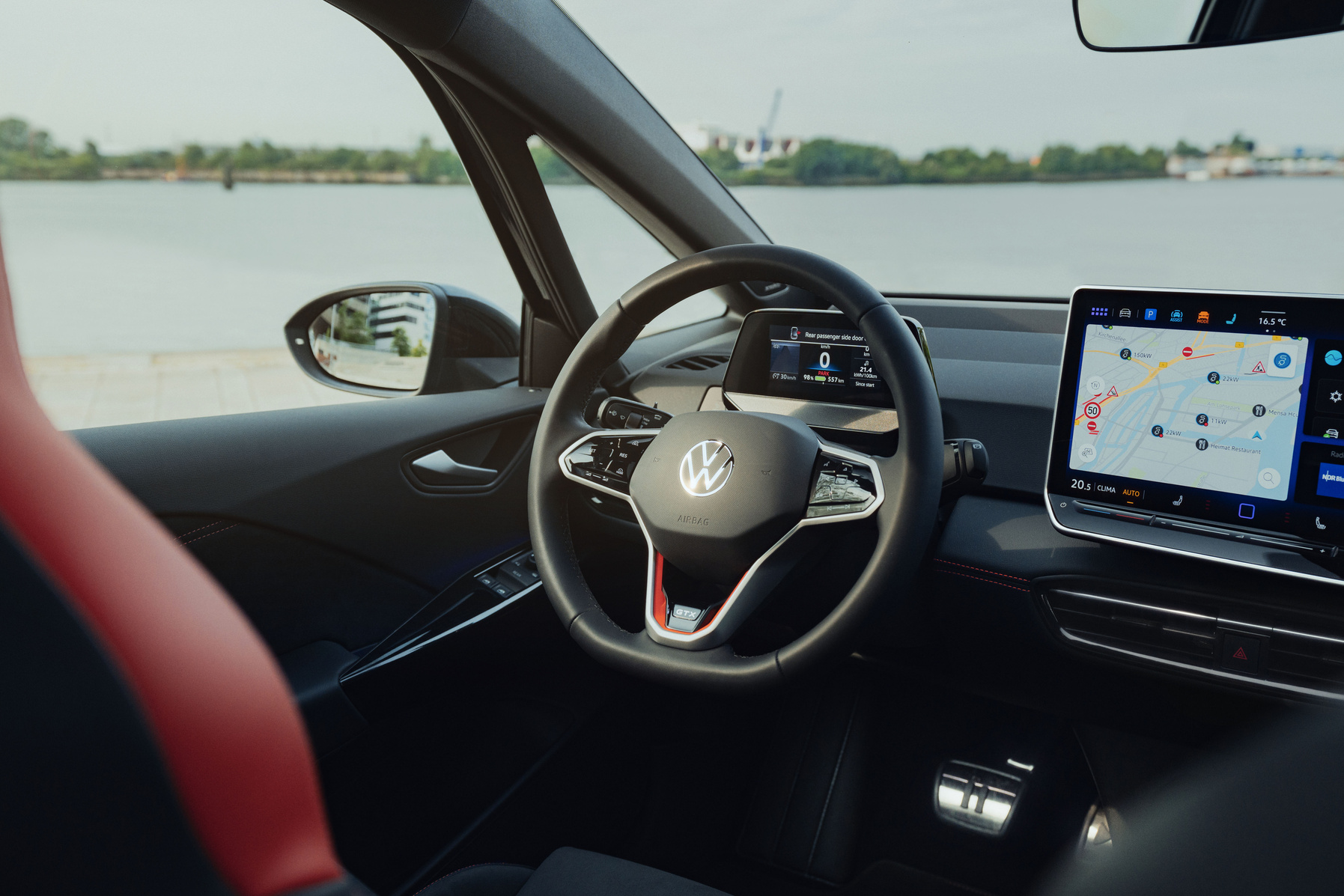
Modern cars are increasingly replacing physical controls with touchscreens. Slow response and unreliability make this choice controversial. The Volkswagen ID.3 illustrates this problem. The model has unlit sliders, slow touchscreen responses and no physical buttons. This leads to distraction and frustration while driving. What makes touchscreen operation so problematic and are there practical alternatives?
Why touchscreens in cars often respond slowly
The central touchscreen in the Volkswagen ID.3 controls almost all functions, from navigation to climate control. Climate control is the control of temperature and ventilation. The screen measures 30.5 cm and works with sliders under the display for temperature and volume. Owners regularly report delays in touch commands, frozen screens and slow start-up of the infotainment system.
These problems occur mainly in early models. The system needs time to start up fully. This happens after you get in. If you do not wait, commands respond with a delay or not at all. In more serious cases you have to reset the system via the fuse or by holding down the on/off button.
From 2023, facelift models bring improvements. The sliders are illuminated for better visibility and software updates ensure more alert screen responses. However, this does not solve the fundamental problem that touch operation while driving demands more attention than physical buttons.
‘ In practice, however, this works unreliably, especially in early models. ’
Volume control without the central screen
The sliders under the screen in the ID.3 offer an alternative for volume control without using the central display. These sliders respond to swiping movements for gradual adjustments. In practice, however, this works unreliably, especially in early models.
A little-known function makes the sliders more usable: they have pressure points. By pressing a specific spot on the slider, you adjust step by step instead of smoothly. This gives more control. You do need to know where these pressure points are. Most owners discover this by chance or not at all.
A practical tip: use Apple CarPlay for audio control. This integration works more smoothly than the car’s own infotainment system. It reads messages aloud safely. This reduces the need to touch the touchscreen while driving.
Pressure-point sliders: unknown functionality with benefits
The pressure-point sliders in the ID.3 offer more than just swipe control. By pressing specific points, you increase or decrease the volume in steps. This gives better control than gliding movements. Precision is difficult while driving.
This function has three advantages:
- More control through step-by-step adjustment instead of gliding movements
- Less frustration because you do not have to swipe several times to get the result you want
- Faster operation when you know and can feel the pressure points
The problem is that Volkswagen hardly communicates this functionality. Manuals devote little attention to it. Salespeople rarely mention it during test drives. As a result, many owners miss this option and continue to struggle with inaccurate swiping movements.
Haptic steering wheel buttons increase distraction
The touch-sensitive surfaces in the steering wheel spokes operate cruise control, audio and menu navigation. These haptic buttons are a frequently mentioned pain point. They are activated too often by accident. They do not respond when you deliberately touch them.
This leads to distraction. You have to tap or scroll several times. You look at the screen more often to check whether the command has been carried out. Users report that haptic buttons do not work well enough. Ordinary physical buttons would be safer because you can feel them without looking.
Volkswagen is bringing back more physical buttons in new models. This happens after 2024. Software updates refine the haptic controls in existing cars, but do not solve the fundamental limitation. Touch-sensitive surfaces lack the tactile feedback that physical buttons do provide.
‘ Driving tests show: touchscreen operation lengthens reaction time. ’
Safety risks of touchscreen operation
Touchscreen operation demands more visual attention. Physical buttons demand less attention. You have to look to see where you are pressing and to check whether the system has responded. This draws your gaze away from the road.
You can feel physical buttons without looking. You develop muscle memory. That means your fingers automatically remember the position and function of the buttons. This allows operation without taking your attention away from the traffic. Touchscreens do not offer this tactile feedback.
Driving tests show: touchscreen operation lengthens reaction time. It takes longer to operate functions via a screen than via physical buttons. The system responds slowly. This reinforces the effect. Simple adjustments require multiple menus.
The ID.3 shows warnings during prolonged screen use, but these sometimes actually block operation. This creates extra frustration. Voice control offers a safer alternative for navigation and media changes. It does not always work reliably enough to rely on completely.
Retrofitting physical buttons: limited options
Adding physical buttons to the ID.3 afterwards is technically complex. It is not officially supported. The interior design is built entirely around touch operation. No space or wiring has been provided for extra physical buttons.
Some owners are looking into aftermarket solutions, but these are scarce. The infotainment system is deeply integrated with other vehicle functions. This makes interventions risky. Modifications can invalidate warranties and disrupt software updates.
A more practical alternative is to optimise the existing system. When buying used, check the software version before purchase. Early ID.3 models have bugs. Keys do not respond. The dashboard stays black. These problems have been solved via updates, but not all vehicles have the latest version installed.
Practical tips for touchscreen operation
Touchscreen operation has limitations. A few adjustments make the system more usable. Start the system and wait a moment. The system now loads fully. This prevents delayed responses and frustration with the first commands.
Use voice control where possible for navigation and media adjustments. This keeps your eyes on the road. The function works better than it used to. It is not perfect. Set as much as possible before departure. Think of navigation destination, climate and music. This reduces the need to use the screen. That way, it does not happen while driving.
The menus become more intuitive. This happens after a few weeks of use. Explore the shortcuts. Also explore the frequently used functions. This speeds up operation. This reduces distraction.
Preheat the battery. This means it charges faster. The system becomes more alert. This especially applies in cold conditions.
On the Carnews website you will find much more information. You can read about infotainment systems, control problems and practical car solutions. Discover more articles and tips that help you get the most out of your car.
Frequently asked questions
An optimal driving experience and safety calls for a hybrid approach: frequently used functions such as indicators, wipers, climate control and volume should be on clear physical buttons or rotary knobs. Less crucial or less frequently used functions can be operated via a responsive, logically arranged touchscreen. It is important that you can find these basic functions by feel, without taking your eyes off the road. Voice control can complement this mix, but cannot replace the physical operation of core functions.
A less responsive touchscreen requires more time and repeated touches, meaning the driver has to look at the screen for longer and therefore pays less attention to the road. Because a touchscreen provides no tactile feedback, you have to check visually whether you are operating the correct function, which increases mental load and distraction. Physical controls with clear buttons or rotary knobs can be operated by feel, so your eyes are off the road less often and for shorter periods. As a result, physical controls generally support concentration on the traffic better than a slow or complex touchscreen.
Car enthusiasts prefer physical controls over touchscreen operation for essential functions such as climate control (temperature and ventilation) and operating the audio system (especially volume control). For crucial driving functions such as operating cruise control and basic steering wheel functions (for example, switches on the steering wheel), physical buttons are also experienced as safer and more pleasant than haptic or fully touch-controlled solutions.
I am moderately positive about fully digital interfaces, as long as they respond quickly and are logically arranged. For frequently used and safety-critical functions (such as volume, climate control and driver assistance systems) I still prefer clear physical buttons. For less important or less frequently used functions, I find digital operation perfectly fine. If user-friendliness and reliability continue to improve, I am willing to embrace digital interfaces more widely.
Haptic feedback on touchscreens is important because it compensates for the lack of physical buttons and helps you confirm actions without constantly having to look at the screen. Without clear vibrations or a click feel, you are more likely to make mistakes or become distracted. The speed of response also determines how much confidence and ease you experience: a slow or stuttering screen feels frustrating and unreliable. A fast, smoothly responding touchscreen with good haptic feedback therefore provides a much more pleasant and safer user experience.